
SUPPORTS LOCAL - POWERED BY MARKETING MADE EASY
Design
Submission
Specifications
For advertisers supplying their own print-ready artwork for the Cary Supports Local postcard campaign.
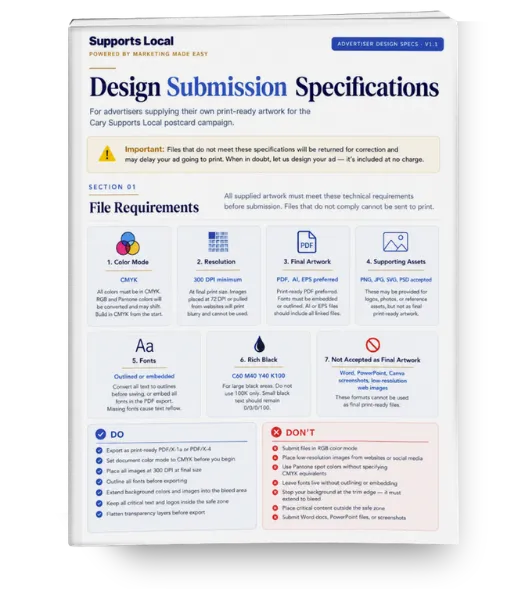
⚠️ Important: Files that do not meet these specifications will be returned for correction and may delay your ad going to print. When in doubt, let us design your ad - it is included at no charge. Feel free to submit a design mockup or ideas and we will professionally design the ad for you.
SECTION 01
File Requirements
All supplied artwork must meet these technical requirements before submission. Files that do not comply cannot be sent to print.
🖨️
COLOR MODE
CMYK
All colors must be in CMYK. RGB and Pantone colors will be converted and may shift. Build in CMYK from the start.
📐
RESOLUTION
300 DPI minimum
At final print size. Images placed at 72 DPI or pulled from websites will print blurry and cannot be used.
📁
ACCEPTED FORMATS
PDF, AI, EPS
Print-ready PDF preferred. Fonts must be embedded or outlined. PSD and INDD accepted with all linked files.
🔡
FONTS
Outlined or embedded
Convert all text to outlines before saving, or embed all fonts in the PDF export. Missing fonts cause text reflow.
⬛
RICH BLACK
C60 M40 Y40 K100
For large black areas. Do not use 100K only - it will appear faded. Small black text should remain 0/0/0/100.
🚫
NOT ACCEPTED
JPEG, PNG, Word, PPT
These formats cannot be used as final files. They may be provided as reference only alongside a proper print file.
✓ DO
- Export as print-ready PDF/X-1a or PDF/X-4
- Set document color mode to CMYK before you begin
- Place all images at 300 DPI at final size
- Outline all fonts before exporting
- Extend background colors and images into the bleed area
- Keep all critical text and logos inside the safe zone
- Flatten transparency layers before export
✕ DON'T
- Submit files in RGB color mode
- Place low-resolution images from websites or social media
- Use Pantone spot colors without CMYK equivalents
- Leave fonts live without outlining or embedding
- Stop your background at the trim edge - extend to bleed
- Place critical content outside the safe zone
- Submit Word docs, PowerPoint files, or screenshots
SECTION 02
Understanding Bleed, Trim & Safe Zone
Every print file has three zones. Understanding each one prevents your ad from being cut incorrectly or having important content trimmed.
🔴 BLEED LINE
Extend all backgrounds, photos, and color fills 0.125" (1/8") beyond the trim line on every side. This extra area gets cut off but prevents white edges from appearing if the cut shifts slightly.
⬛ TRIM LINE
This is the actual final size of your ad after cutting. Your document should be set to this exact size. Build at 100% scale - do not scale up or down when exporting.
🟢 SAFE ZONE
Keep all logos, phone numbers, addresses, headlines, and critical copy at least 0.125" inside the trim line. Content too close to the edge risks being partially cut off.
SECTION 03
Ad Size Specifications
All dimensions shown as Width × Height. Each size may be oriented horizontally or vertically — specify your preferred orientation when submitting. Diagrams are not to scale.
| Ad Size | Trim Size (W×H) | With Bleed (W×H) | Safe Zone (W×H) | Orientation Options | Rate |
|---|---|---|---|---|---|
| Small | 3" × 2" or 2" × 3" | 3.25" × 2.25" | 2.75" × 1.75" | Landscape or Portrait | $395 |
| Medium | 3" × 3" | 3.25" × 3.25" | 2.75" × 2.75" | Square | $495 |
| Large | 3" × 4" or 4" × 3" | 3.25" × 4.25" | 2.75" × 3.75" | Portrait or Landscape | $595 |
| Double Large | 6" × 4" or 4" × 6" | 6.25" × 4.25" | 5.75" × 3.75" | Landscape or Portrait | $895 |
| Monster | 11" × 4" | 11.25" × 4.25" | 10.75" × 3.75" | Landscape only | $1,195 |
Small
$395
Best for: Clean logo, one strong offer line, phone or website. Limited copy space — keep it simple.
Medium
$495
Best for: Logo + strong offer + one supporting line. Square format reads well for photos and service illustrations.
Large
$595
Best for: Logo, headline, 2–3 offer points, phone, website, and a photo. Enough space to tell the full story.
Double Large
$895
Best for: Full visual campaign with photo, multiple offers, complete branding, and a strong call to action. Dominates the card visually.
Monster
$1,195
Important: The Monster runs the full width of the 11" × 14" postcard. Landscape orientation only. Background must extend to bleed on all four sides. No portrait option.
SECTION 04
Content Guidelines
A postcard ad has seconds to make an impression. These guidelines help your ad work as hard as possible.
🏆 What Every Ad Must Include
- Business name or logo
- One clear, compelling offer or promotion
- Phone number or website (or both)
- Space for a QR code (we add this — see Card 2)
- Expiration date or offer terms if applicable
📱 QR Code — Leave Space
We add a unique tracking QR code to your ad that links to your dedicated offer page. Do not include your own QR code.
Leave a reserved area of at least 0.75" × 0.75" somewhere in your design for us to place the QR code. Indicate the placement location in your file notes.
✍️ Offer Best Practices
- Specific beats vague: "$30 OFF" outperforms "Call for a Quote"
- One offer outperforms three offers every time
- Add an expiration date to create urgency
- "New customers only" removes risk and increases response
- Make it something you can honor every time, no exceptions
💡 Not Sure What to Offer?
We have seen hundreds of local campaigns. The offers that consistently pull the best response:
- Free consultation or assessment (service businesses)
- Percentage off for new customers (10–20%)
- Dollar off on first visit or first service
- Two-for-one or bonus with purchase (restaurants)
- Free first month, free inspection, free estimate
SECTION 05
Pre-Submission Checklist
Before submitting your file, work through our complete pre-submission checklist. It covers every technical requirement in one printable page.
Download the Pre-Submission Checklist
A printable 9-point checklist covering every requirement your file must meet before we can send it to print. Work through it before uploading your artwork.
PDF · 2.3MB · Opens in a new tab
Questions? We're here to help.
Jonathan Munsell · 919-646-3322
Upload files to your shared Google Drive folder or email directly.
DESIGN FILES DUE
14 days before drop date
Jonathan will confirm your specific deadline